
I/O Management
A core responsibility of an operating system is managing the computer’s hardware. This responsibility covers not only the CPU and memory, but also input/output (I/O) devices.
I/O Devices
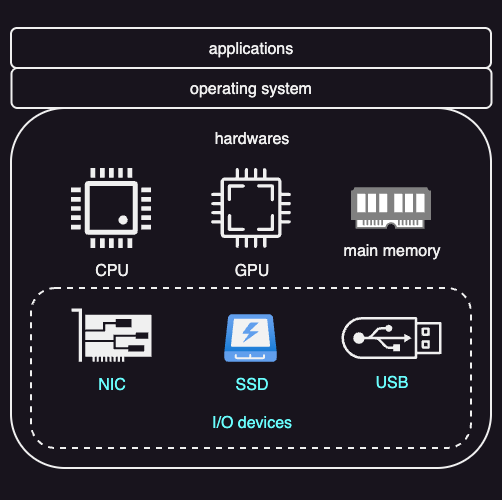
I/O devices cover a wide range of hardware. Common examples are storage devices such as SSDs, network interface cards (NICs), and devices used for human interaction, including displays, keyboards, speakers, and microphones.
Since I/O devices behave very differently from one another, the operating system needs to hide these differences from applications. To make this separation possible, operating systems rely on two key ideas:
- Standard interfaces
- Device drivers
Standard Interfaces
Because I/O devices are very different, applications cannot communicate with them directly. Instead, the operating system defines standard interfaces for broad classes of devices, such as storage devices, network devices, or display devices. These interfaces define what operations a device supports (for example, read, write, send, receive) and how those operations are requested. Applications interact only with these interfaces, not with the hardware itself. This allows the same application code to work with many different devices of the same type.
At a lower level, devices must physically connect to the CPU and memory. In modern systems, this is done using device interconnects, most commonly PCI Express (PCIe).
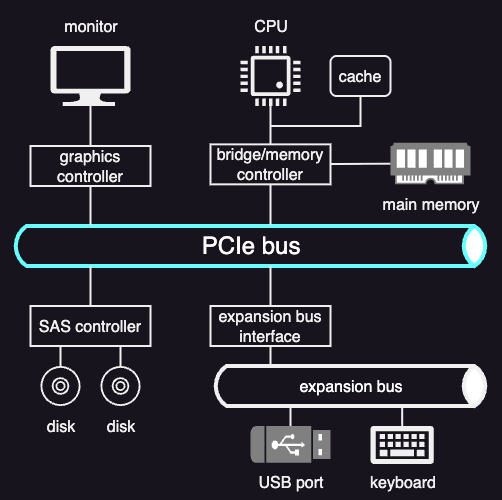
PCIe provides a high-speed, point-to-point connection between devices and the CPU. Unlike the older shared PCI bus, PCIe uses dedicated links (lanes) for each device. Through PCIe, devices can exchange data with the CPU, memory, and the rest of the system in a standardized way.
Other types of buses are also used even in a PCIe system, depending on the device. For example:
- SATA controllers for certain storage devices
- Simpler peripheral buses (such as USB) for devices like keyboards and mice
The choice of bus affects performance, how devices are discovered at boot time, and how the operating system manages and schedules access to hardware.
Device Drivers
A device driver is software that knows how to control a specific hardware device. Each driver contains all the device-specific code needed to configure the device, send commands to it, move data in and out, and respond to events such as interrupts or errors.
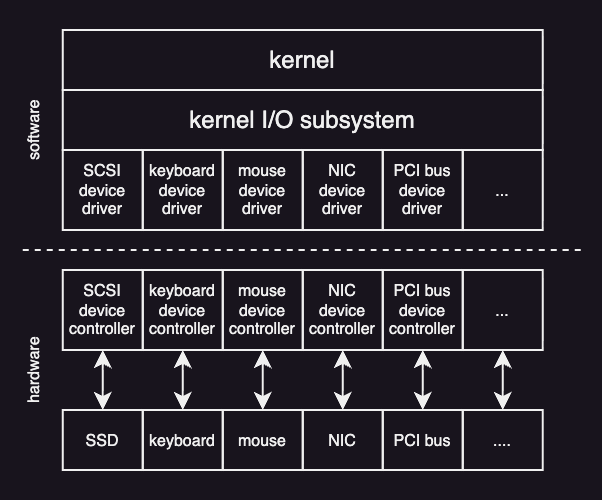
When an application makes an I/O request through a standard interface, the operating system forwards that request to the appropriate driver. This design allows the operating system and applications to remain unchanged even when hardware is replaced, as long as the correct driver is available. From the operating system’s perspective, supporting a new device usually means adding a new driver, not rewriting the rest of the system.
Typically, the operating system defines a standard device driver framework, and hardware manufacturers provide drivers that fit into this framework. This is why users often need to install drivers when adding new hardware, such as printers.
At the hardware level, a device controller contains built-in logic and firmware that directly run the physical device. It receives commands from the device driver, performs the requested actions, transfers data between the device and memory, and signals completion or errors via interrupts.
Devices as Files
Many operating systems represent devices as files. This means applications can interact with devices using familiar operations such as read and write.
On Unix-like systems, devices appear as special files under the /dev directory.
For example, running echo "hello, world" > /dev/lp0 sends the text hello, world to the first line printer (lp0).
Although this looks like a normal file write, the kernel intercepts the operation and translates it into the appropriate device-specific commands handled by the printer driver.
Unix-like operating systems provide a virtual device known as the null device, exposed as /dev/null.
Any data written to this device is discarded by the kernel.
Typical Device Access Flow
Typically, user programs cannot access hardware devices directly. Instead, device access goes through the operating system:
- When a process needs to use a device—such as sending a network packet or reading a disk file—it makes a system call. This transfers control from the process to the kernel.
- Inside the kernel, the operating system runs the relevant internal code:
- Networking requests go through the TCP/IP stack.
- File requests go through the file system to locate disk blocks.
- The kernel converts the high-level request into a low-level device operation.
- The kernel then calls the device driver, which understands the hardware details. The driver:
- Translates requests into device-specific commands
- Configures the device by writing to its registers
- Manages pending requests safely
- The driver uses mechanisms like programmed I/O or DMA to transfer data. Once configured, the device performs the operation, such as transmitting data or reading from disk.
- When the operation finishes, the result travels back through the driver and kernel to the user process.
OS Bypass
Some devices support a different model in which applications can access hardware without going through the kernel on every operation. This is called operating system bypass (OS bypass).
In this model, the operating system is involved only during setup. It maps device memory and registers into the process’s address space and establishes permissions. After setup, the data path goes directly between the user process and the device.
Because the kernel is no longer in the data path, applications use a user-level driver, typically a library provided by the device vendor, to issue device commands.
Blocking, Nonblocking, and Asynchronous I/O
When a process issues an I/O request, the device will eventually return some response. What happens to the calling thread depends on whether the I/O is synchronous or asynchronous.
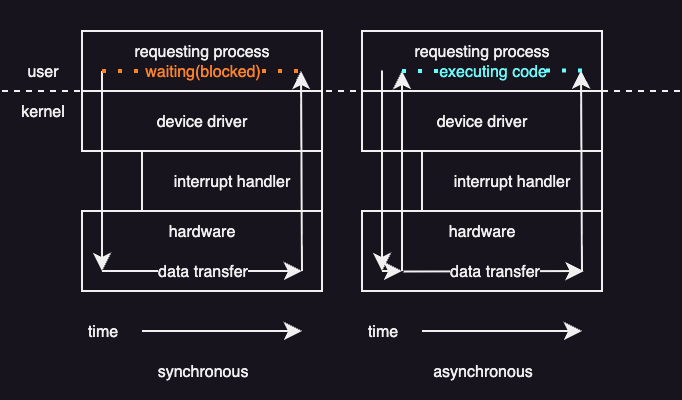
An important design choice in the system-call interface is how I/O operations interact with a running program. The key question is whether the calling thread should wait for I/O to finish or continue running while the I/O happens in the background.
Blocking (synchronous) I/O
In blocking I/O, a system call pauses the calling thread until the I/O operation completes.
Here is what happens step by step:
- The application issues a blocking system call (for example,
read()). - The operating system suspends the calling thread.
- The thread is moved from the run queue to a wait queue.
- When the I/O finishes, the thread is moved back to the run queue.
- When the thread runs again, it receives the return values from the system call.
Although I/O devices work asynchronously at the hardware level and may take an unpredictable amount of time, operating systems still offer blocking calls. The reason is simple: blocking code is easier to write and reason about.
Nonblocking I/O
Some operating systems provide nonblocking I/O system calls. These calls do not suspend the thread for a long time.
A nonblocking call:
- Returns immediately.
- Reports how many bytes were transferred.
- May return fewer bytes than requested, or even zero, if no data is available yet.
The thread can then decide whether to try again later or do something else. This avoids wasting CPU time and allows computation to overlap with I/O.
One way to handle this problem is multithreading. An application can create multiple threads:
- Some threads perform blocking I/O.
- Other threads continue running useful work.
This approach works well but increases complexity due to synchronization and shared data management.
Asynchronous I/O
Another option is asynchronous I/O, which goes one step further.
With an asynchronous system call:
- The call returns immediately.
- The operating system guarantees that the entire I/O request will be completed later.
- The thread continues executing without waiting.
When the I/O finishes, the operating system notifies the application using one of several methods:
- Updating a variable in the process’s address space
- Sending a signal or software interrupt
- Invoking a callback function
Asynchronous operations are common inside modern operating systems, even when applications are not directly aware of them.
Block Device Stack
The block device stack describes how an I/O request follows from an application down to the physical storage device.
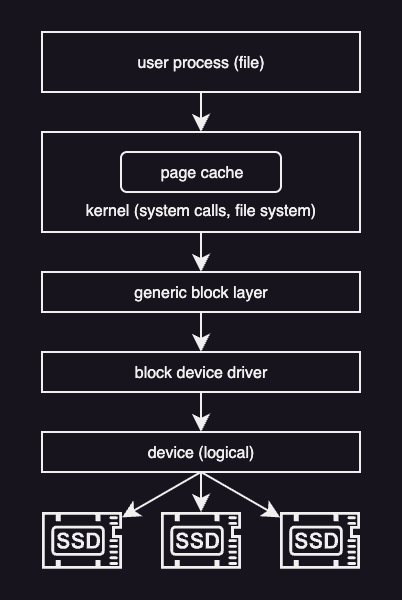
At the top of the stack are applications.=
As explained eariler, applications do not work with disks directly.
Instead, they operate on files, which are logical objects provided by the operating system.
Programs use system calls such as open, read, and write to access files without knowing where or how the data is stored.
These system calls are handled by the file system. The file system manages files and directories, checks permissions, and translates file-level operations into accesses to disk blocks. Before accessing the disk, the operating system usually checks the page cache. If the requested data is already in memory, it can be returned immediately. If not, the request continues down the stack.
Below the file system and page cache is the generic block layer. This layer provides a common interface for different block devices such as HDDs, SSDs, and USB drives. Even though these devices work differently internally, the block layer hides those differences and schedules read and write requests.
At the bottom of the stack are the device drivers. Drivers communicate directly with the hardware and handle device-specific commands, errors, and interrupts.
A typical storage request flows down the stack as follows:
- Application calls read or write
- Operating system enters the file system. If data is present in page cache, return immediately.
- File system maps the request to disk blocks
- Block layer schedules the request
- Device driver accesses the hardware
Virtual File System
Modern operating systems support many different kinds of storage. Files may live on different disks, use different file system formats, or even be stored on remote drives and accessed over a network. Despite this complexity, applications should not need to know where a file is stored or how it is managed internally.
To solve this problem, operating systems such as Linux use a Virtual File System (VFS) layer. The VFS sits between applications and the actual file systems. Applications interact with files using a standard interface, such as the POSIX API, and the VFS takes care of translating these requests to the appropriate underlying file system.
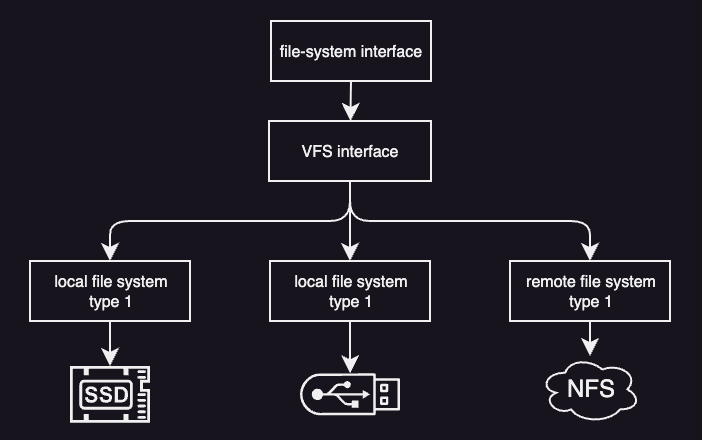
This separation makes it easy to add new file systems or switch storage devices without modifying application code.
To support many file systems in a uniform way, the VFS defines a small set of common abstractions.
Files and File Descriptors
A file is the basic object that the VFS operates on. When a process opens a file, the operating system creates a file descriptor, which is a small integer used to identify that open file.
All file operations—such as reading, writing, locking, or closing—are performed using the file descriptor. The file descriptor exists only while the file is open and is specific to the process that opened it.
Inodes
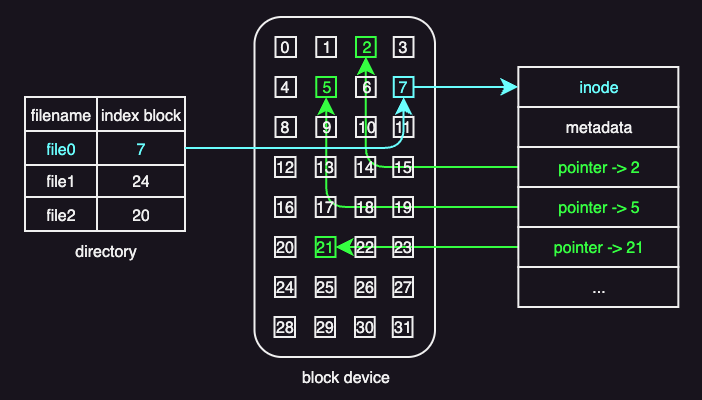
An inode (short for index node) is the core data structure a file system uses to manage files. Internally, each file is identified by an inode number, not by its file name. The file name is just a human-friendly label used to locate the corresponding inode.
An inode contains a list of disk block numbers that store the file’s actual data. In this sense, the inode acts as an index: it does not store the file contents itself, but instead stores pointers to the blocks that hold the contents. Reading those blocks in the correct order reconstructs the file.
When more data is written to a file and extra space is needed, the file system:
- Allocates a free disk block
- Adds its block number to the inode
- Updates the inode on disk
The inode always reflects the current layout of the file.
Besides block pointers, an inode also stores metadata such as:
- Access permissions
- Ownership
- Locking or status information
This metadata is used to enforce access rules and manage concurrent use.
This inode-based design supports efficient access patterns. Sequential access simply follows the list of blocks in order, while random access directly computes the required block from the file offset.
The main drawback of this simple design is that it limits how large a file can be. Consider this example:
- Inode size: 128 bytes
- Each block pointer: 4 bytes
- Maximum number of block pointers: 128 / 4 = 32
- Block size: 1 KB
With only direct block pointers and no space for metadata, the largest file that can be addressed is 32 blocks * 1 KB = 32 KB.
A common way to overcome the file-size limitation of simple inodes is to use indirect pointers.
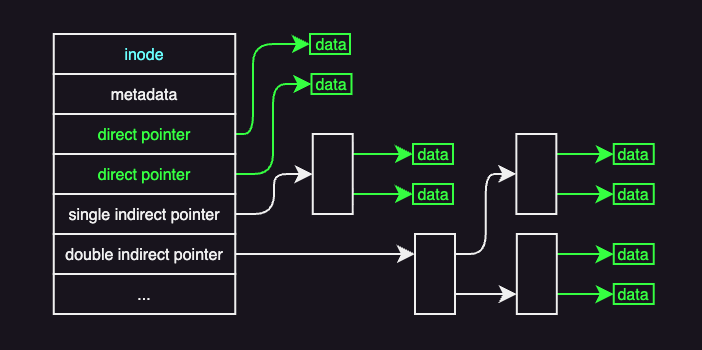
An inode still begins with metadata, followed by pointers to data blocks. The first pointers are direct pointers, which point straight to blocks containing file data.
An indirect pointer does not point to data directly. Instead, it points to a block that contains only block addresses. A 1 KB block can store 256 such addresses, allowing a single indirect pointer to reference 256 KB of file data. For larger files, double or even triple indirect pointers are used. A double indirect pointer, for example, points to a block of pointers to other pointer blocks, which then point to data blocks. With 256 pointers per block, double indirect addressing supports up to 64 MB of data.
The trade-off of using indirect pointers is that it increases file size but also increases access cost.
Directories and Dentires
Files are organized into directories. From the VFS perspective, a directory is simply a special kind of file. The difference is that the contents of a directory describe file names and the inodes they refer to.
Dentires are cached in memory in what is known as the dentry cache. This cache avoids repeated disk accesses when the same directories are accessed multiple times. Dentires are not stored on disk. They are temporary objects maintained only in memory.
Superblock
Every file system has a superblock, which describes how the file system is laid out on disk. The superblock contains information such as:
- Where inodes are stored
- Where data blocks are located
- How free space is managed
The superblock acts as a map that allows the operating system to interpret the on-disk data structures correctly.
Many VFS structures, such as file descriptors and dentries, exist only in memory. Others, including file data, inodes, and superblocks, must be stored persistently on disk.
A widely used modern file system in Linux is ext4 (4th extended file system), which is the successor to ext2 and ext3.
Disk Access Optimizations
Disk operations are much slower than memory operations, so file systems use several techniques to reduce disk access and improve I/O performance. These techniques focus on keeping data in memory, reducing disk head movement, and avoiding unnecessary random accesses.
Key techniques include:
- buffer caching: Keep recently accessed file data in memory so most reads and writes avoid disk access; changes are flushed to disk periodically.
- I/O scheduling: Reorder disk requests to minimize disk head movement and favor sequential access over random access.
- prefetching: Load nearby file blocks into memory in advance, increasing cache hits and reducing future access latency.
- journaling: Record updates in a sequential log before writing them to their final disk locations, improving reliability while limiting random disk writes.