
Virtualization
In the 1960s, early computers like IBM mainframes typically ran only one operating system at a time. This design had several drawbacks:
- Different workloads could not easily share the same hardware.
- Hardware was often idle.
- Testing a new OS or switching OSes required another machine or a reboot.
Virtualization was created to solve these problems. With virtualization, multiple operating systems and applications can run at the same time on the same hardware. Each one acts like it has its own machine, without forcing everyone to use the same operating system.
Virtual Machines and the Hypervisor
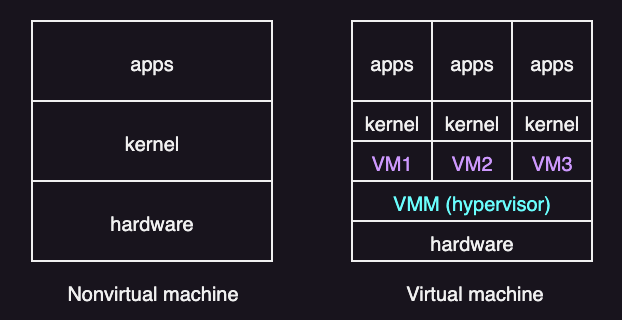
Virtual Machines
An early definition of a virtual machine is:
A virtual machine is taken to be an efficient, isolated duplicate of the real machine. –Popek and Goldber, 1974
A virtual machine (VM) is a software-defined machine that shares the physical CPU, memory, and devices. A VM is also called a guest or a domain.
The operating system running inside a VM is called the guest operating system (guest OS). From the guest operating system’s point of view, it is running on a real machine. Therefore, the guest OS does not know (and ideally does not care) that it is sharing physical resources with other VMs.
Hypervisors
To run multiple VMs safely, you need a control layer that manages hardware and keeps VMs apart. This layer is called virtual machine monitor (VMM), or hypervisor.
In most virtualization literature, VMM means virtual machine monitor (the hypervisor). But, some products also use VMM to mean virtual machine manager (a management tool).
A hypervisor is software that sits between the physical hardware and the virtual machines. It is responsible for mainly three goals:
- Fidelity: The VM should look like a real machine. The guest OS should not need special changes just to boot and run.
- Performance: The hypervisor should not slow down normal execution.
- Safety: The hypervisor must control shared resources.
In general, the hypervisor stays out of the way during ordinary execution. It mainly steps in when a guest tries to do something that must be controlled, such as:
- Accessing privileged CPU registers
- Changing page tables
- Performing certain I/O operations
Benefits and Drawbacks
Virtualization is widely used because it has multiple benefits:
- Consolidation: Run many servers on one machine to increase utilization.
- Cost reduction: Fewer machines means less power, cooling, and hardware cost.
- Portability: A VM is easy to copy, move, or back up.
- Fast provisioning: You can create new VMs quickly from templates.
- Maintenance and migration: You can move VMs during hardware maintenance or load changes.
- Fault isolation: A crash in one VM does not have to crash others.
- Testing and debugging: OS experiments are easier when you can snapshot and roll back.
- Legacy support: Old OSes can run without dedicating old hardware.
However, virtualization also has drawbacks:
- Performance overhead compared to running directly on hardware.
- Increased system complexity and management overhead.
- Limited direct resource sharing due to isolation.
- Host failure can impact many VMs unless redundancy is used.
- Licensing and virtualization platform costs may be significant.
Types of VMs
VMM implementations differ widely. Common approaches are:
- Type 1
- Type 2
- Paravirtualization
- Containerization
In some systems like IBM LPARs and Oracle LDOMs, virtualization support is built directly into the hardware or firmware, rather than implemented as a traditional software hypervisor. These systems are often called Type 0 hypervisors.
Type 1: Bare-metal hypervisor
In type 1, the hypervisor runs directly on the hardware, without a host operating system underneath. It has full control over the machine and usually provides better performance and stronger isolation. The VMs run on top of hypervisor.
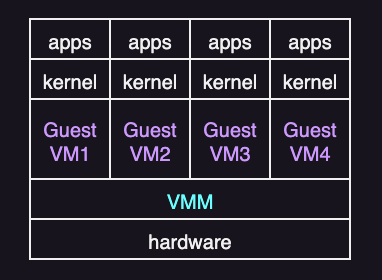
Type 1 is common in data centers and cloud platforms.
Examples of type 1 virtualization are:
- VMware ESXi
- XenServer
- Linux KVM
- Microsoft Hyper-V
Type 2: Hosted virtualization
In type 2, a normal host OS runs on the hardware first. The virtualization software runs on top of that OS. The host OS then supplies device drivers and many I/O services. And the hypervisor is hosted by the OS.
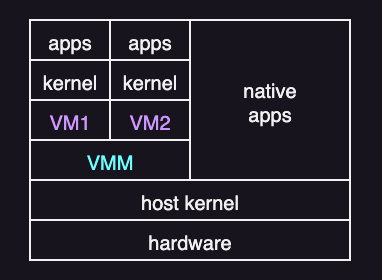
Type 2 is common on personal computers and for development or testing.
Examples of type 2 virtualization are:
- VMware Fusion and Workstation
- Oracle VirtualBox
- Parallels Desktop
Paravirtualization
Paravirtualization does not try to fully imitate real hardware. Instead, the guest OS is modified to work in cooperation with the VMM to optimize performance.
In a paravirtualized system, the guest kernel replaces some privileged operations with hypercalls. A hypercall is like a system call, but instead of entering the OS kernel, it enters the hypervisor. Examples of privileged operations that are commonly done via hypercalls include:
- Updating page tables
- Configuring interrupts
- Performing device I/O operations
Paravirtualization can be faster because hypercalls avoid replying on traps or instruction rewriting. The downside is that the guest OS must be modified and maintained. It can also be less portable, because it depends on a particular hypervisor interface.
XenServer popularized this approach.
Containerization
Sometimes the goal is not to run a full guest OS, but to isolate and manage just applications. If all applications run on the same OS, full virtualization may be unnecessary. Instead, the system can use containerization (or application containment).
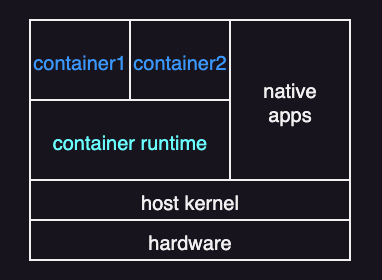
A container is an isolated environment for running applications while sharing the host OS kernel. Unlike a virtual machine, a container does not include a guest OS and does not virtualize hardware. Instead, it bundles only what the application needs to run, such as the application binaries, libraries, and configuration files.
Compared to other virtualization approaches, its main advantage is efficiency. Containers are much lighter than VMs. They use fewer resources and can start and stop quickly—more like processes than full virtual machines.
Containerization is popular in software development and deployment, particularly in cloud systems. It is commonly managed with tools like Docker and Kubernetes.
Building Blocks
Whether virtualization is possible basically depends a lot on the CPU’s features.
To virtualize a system, the hypervisor must provide an exact duplicate of the underlying machine. This is especially difficult on older systems that support only two CPU modes: user mode and kernel mode.
For example, classic x86 defines four privilege levels, called rings:
- Ring 0: most privileged, used by the OS kernel
- (Rings 1 and 2 exist, but they are rarely used.)
- Ring 3: least privileged, used by user programs
On CPUs with only these privilege rings, it’s hard to fit a hypervisor in the right place. The hypervisor needs to run with the highest privileges so it can keep control. But a normal OS is written assuming it also runs with the highest privileges (ring 0). If you push the guest OS down to a less-privileged ring (like ring 3), some operations won’t behave the same way, and the hypervisor may not be able to catch and handle them correctly.
To fix this limitation, modern x86 CPUs add hardware support for virtualization (Intel VT-x and AMD-V). They introduce two new modes:
- Root mode: used by the hypervisor
- Non-root mode: used by guest operating systems
With this setup, the guest kernel can still run in ring 0, but it runs in non-root mode. In other words, it looks like ring 0 to the guest, but the CPU still keeps it on a leash.
When the guest executes certain sensitive instructions, the CPU automatically traps into the hypervisor. Control switches from non-root to root mode, the hypervisor handles the request, and then the CPU returns to the guest.
On top of this hardware foundation, VMMs use techniques such as trap-and-emulate and binary translation to handle privileged behavior efficiently.
Another important concept is the virtual CPU (vCPU). A vCPU does not execute instructions by itself. Instead, it stores what the guest thinks the CPU state is, including things like:
- Register values
- Program counter
- CPU flags
For each VM, the VMM keeps one or more vCPU data structures. When the VMM schedules a guest to run on a real CPU core, it does a simple save/restore cycle:
- Load: copy the saved CPU state from the vCPU into the real CPU (registers, instruction pointer, flags, etc.).
- Run: let the guest execute for a time slice, until it traps, blocks, or gets preempted.
- Save: copy the updated CPU state back into the vCPU so the guest can resume later from the same point.
Trap-and-Emulate
On a typical CPU with only two modes (user and kernel) without extra hardware support, the guest kernel can execute only in user mode. Because the VM must imitate the physical machine, the VMM provides virtual modes:
- Virtual user mode
- Virtual kernel mode
Both virtual modes still execute in physical user mode.
For example, the following actions cause a transfer from user mode to kernel mode on a real machine:
- a system call
- an interrupt
- a privileged instruction
When the same actions occur inside the guest kernel, the VM must also transfer from virtual user mode to virtual kernel mode. This is done using trap-and-emulate:
- The guest kernel executes a privileged instruction.
- Because the guest kernel is in physical user mode, it causes a trap to the VMM (in the real machine).
- The VMM executes (or emulates) the privileged instruction of the guest kernel.
- It then returns control to the virtual machine.
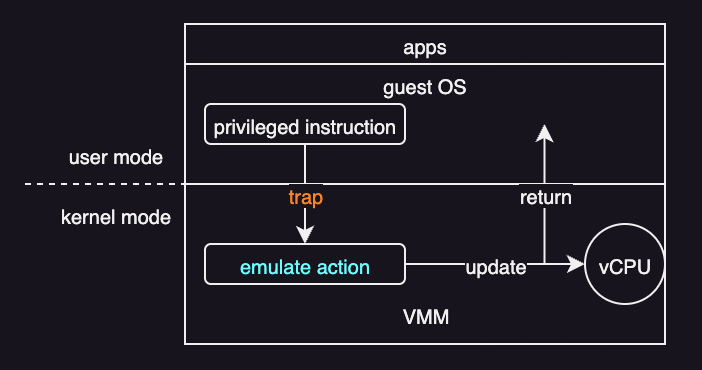
The downside is overhead. Nonprivileged instructions run at near native speed, but privileged instructions trap to the VMM and must be emulated. Sharing the CPU across multiple VMs can also make performance unpredictable.
However, as hardware has improved, trap-and-emulate has gotten faster, and the system needs it less often. For example, modern CPUs add extra modes for virtualization beyond the typical user and kernel modes. This lets the CPU handle more of the work directly at the hardware level, so the VMM has less to do.
Binary Translation
Trap-and-emulate works only on CPUs where all sensitive instructions trap when executed in unprivileged mode. If some sensitive instructions can run without trapping, trap-and-emulate alone is not sufficient.
Binary translation fixes this by rewriting guest kernel code on the fly. Assume there are some sensitive instructions that do not automatically trap. Call them special instructions. Then:
- If the guest vCPU is in virtual user mode, the guest can run its instructions natively on a physical CPU.
- If the guest vCPU is in virtual kernel mode, the VMM inspects every instruction by the guest:
- Non-special instructions run natively.
- Special instructions are translated (rewrited) into safe sequences that produce the same effect
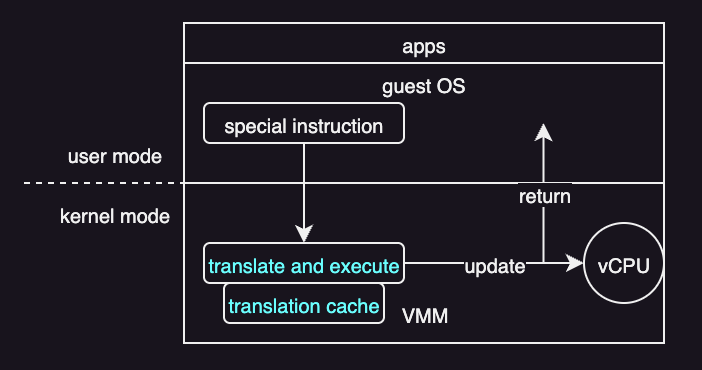
Even though most instructions run natively, special instructions still add overhead because they must be translated. To reduce this cost, the VMM saves translated code in a translation cache. When the same code runs again, the VMM can reuse the cached translation instead of translating it again.
Core Operating-System Components in Virtualization
CPU Scheduling
The effect of virtualization on scheduling varies a lot. This is because virtualization can make even a single-CPU system look like a multiprocessor sytem. For example, even if a host has six physical CPUs, the VMM can present twelve vCPUs across its guests. This implies:
- If there are enough physical CPUs to satisfy each guest’s requested vCPUs, the VMM can treat the allocation as effectively dedicated. It can schedule only a given guest’s threads on that guest’s assigned CPUs. In this situation, the guests behave much like native operating systems running on native hardware.
- If the total number of requested vCPUs exceeds the available physical CPUs (overcommitment), the VMM relies on a standard scheduling algorithm so that guests continue to perceive adequate CPU availability. For instance, with six physical CPUs and twelve vCPUs total, the VMM can distribute CPU time proportionally, so each guest effectively receives about half of the host’s CPU capacity.
Under CPU overcommitment, some performance degradation is expected because vCPUs must time-share physical CPUs and may spend time waiting to be scheduled.
Memory Management
VMMs typically overcommit memory, so the total memory allocated to guests can exceed the amount of physical memory available. This increases memory pressure because there are more guest operating systems and their applications, plus the VMM itself. Therefore, the VMM must preserve the illusion that the guest has that amount of memory, even when physical memory is smaller. To do that:
- The VMM first evaluates each guest’s maximum memory size so that the guest OSes continue to believe they have what they asked for.
- The VMM then computes how much memory to actually give it right now based on current load and overcommitment.
- The VMM then reclaims memory from the guests when the host system is running low on memory.
For reclaiming memory, the most commonly used technique is memory ballooning, developed by VMware. Here, a balloon driver is loaded into the guest as a pseudo-device driver.
A pseudo–device driver uses device-driver interfaces, appearing to the kernel to be a device driver, but does not actually control a device. Rather, it is an easy way to add kernel-mode code without directly modifying the kernel.
The role of a balloon driver is to make the guests aware of the low memory status of the host. It does this by polling the hypervisor and getting a target balloon size. Without this driver, the VM cannot detect host memory pressure because the VM is isolated from the host. When the host is low on memory:
- The hypervisor sets a target balloon size based on how much memory it wants to reclaim.
- The balloon driver “inflates” the balloon inside the guest. It allocates and pins that amount of guest physical memory to the balloon. This makes the guest OS treat those pages as in use.
- The balloon driver reports the pinned page frame numbers to the hypervisor. The hypervisor can then reclaim the host physical pages backing those frames.
When the host has enough memory again, the hypervisor “deflates” the balloon, and the balloon driver releases pages back to the guest.
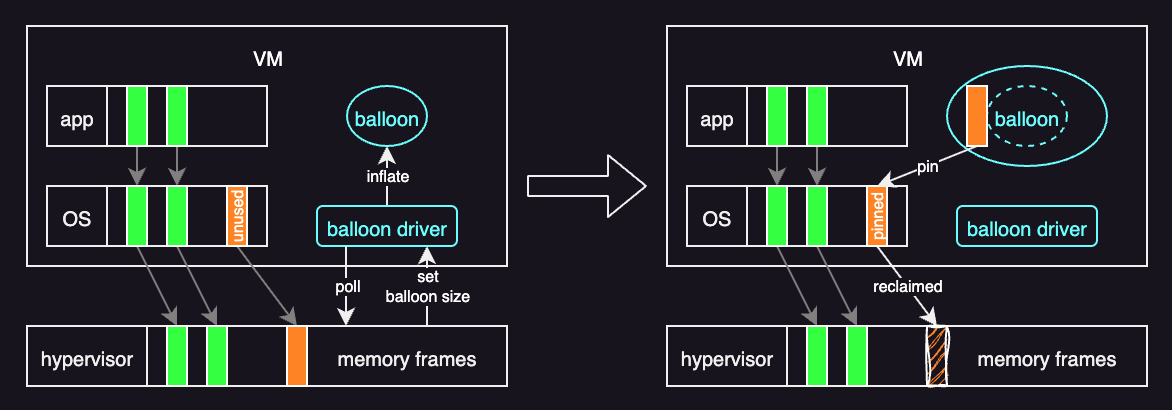
The key benefit of ballooning is that it lets the guest operating system decide which pages to page out. The hypervisor does not need to be involved in that decision.
Storage Management
In a virtualized system, storage must be handled differently from a native operating system.
The exact approach depends on the type of hypervisor:
- Type 1 hypervisors store each guest’s root disk and configuration data as one or more files in file systems managed by the VMM.
- Type 2 hypervisors store the same information as files in the host operating system’s file systems.
In practice, a guest’s entire root disk is packaged into a single disk image file managed by the VMM. Although this design can introduce performance overhead, it is highly practical. It makes copying, backing up, and moving virtual machines straightforward. For example, if an administrator wants to create a duplicate guest for testing, they can simply copy the disk image file and register the new copy with the VMM. Similarly, moving a virtual machine between systems running the same VMM is easy: shut down the guest, copy the disk image to the new system, and start the guest there.
Many VMMs also support converting systems between physical and virtual systems:
- Physical-to-virtual (P-to-V) conversion: converts a running physical machine into a virtual machine. This is done by copying its disk contents into virtual disk image files.
- Virtual-to-physical (V-to-P) conversion: converts a virtual machine into a physical system. This is useful for debugging a problem where the virtualization layer itself may be contributing to the issue.
I/O Management
I/O virtualization is easier than CPU or memory virtualization because operating systems already handle many kinds of devices through device drivers. A hypervisor uses this by providing specific virtualized devices to guests.
Common ways a VMM handles I/O:
- Pass-through (dedicated device): one real device is directly dedicated to one guest. This can be close to native speed, but other guests cannot use that device.
- Shared device: many guests share one real device. The VMM must sit in the middle for every I/O to keep guests isolated and send data to the right place.
- Split-device: the guest uses a simple driver that talks to the VMM, and the VMM talks to the real hardware. This is often faster and easier to manage than fully emulating real devices.
Direct access can be fast in type 0 hypervisor, but type 1 and type 2 hypervisors usually need hardware support. Without it, I/O slows down because the hypervisor must handle many extra events, especially interrupts.
For networking, each guest must have at least one IP address to communicate with other systems. The VMM then acts like a virtual switch to route the packets to the right guest. Guests can connect using:
- Bridging: the guest appears directly on the external network with its own IP.
- NAT: the guest uses an internal IP, and the VMM translates and forwards traffic.
VMMs often also provide basic firewall rules to control traffic between guests and to the outside network.